Bitcoin Insights & Updates

What OER and Free Textbook Websites Really Mean

Start Here: Find Free, Trustworthy Textbooks Without the Noise
You want to learn what Bitcoin really is.
But when you search online, you get hype, memes, and “get rich quick” pitches. Not calm, clear teaching.
 This guide is different. It helps you find real, free textbook websites and study material that:
- Explain Bitcoin in simple, honest language
- Are legal to download and share
- Come from trusted schools, authors, or open projects
We will focus on sources like:
- Open educational resources from schools and libraries
- Textbooks with Creative Commons licenses
- Academic papers you can find through tools like Google Scholar and similar scholar tools
Creative Commons licenses are a big part of this. They let authors give you clear, legal permission to use their work, for free, in certain ways.[^1] In 2026 these licenses are one of the main building blocks of open educational resources, or OER, all over the world.[^2]
You do not need to become a copyright expert. You just need to know the basics, like:
- What a Creative Commons logo means
- Why some books are free to read, but not to remix
- How to spot legal sharing, not piracy
If you ever want to go deeper, library guides explain how these licenses work with normal copyright and make sharing safer for both you and the creator.[^3]
In this guide, you will learn how to:
- Pick free textbook websites that are safe and legal
- Use tools like Google Scholar for Bitcoin facts instead of random blogs
- Check who wrote a book, who hosts it, and if it is up to date
- Use online courses for personal development that teach Bitcoin calmly, not with fear or FOMO
You will also see how free textbooks can fit into a small learning plan, like your own simple “Bitcoin course.” If you want steady, step by step help, you can also join the free Clicks and Trades newsletter for clear crypto education and safety tips, in short lessons that fit a busy day.
By the end, you will know how to sort:
- Signal from noise
- Teaching from sales talk
- Real education from scams
If you are ready to build calm, practical Bitcoin knowledge using safe free textbook websites, you can start now. And if you want guided support as you learn, you can Sign Up for the free Clicks and Trades newsletter so you never have to sort this out alone.
[^1]: You can read how Creative Commons licenses give standard ways to share work on the official About CC Licenses page.
[^2]: Many libraries now build OER collections around Creative Commons tools, as shown in recent OER and Creative Commons overviews.
[^3]: For a clear intro, see how one major university library explains that CC licenses work with normal copyright to make reuse easier in its guide About Creative Commons Licenses.
1) OER 101: What “Free Textbook Websites” Really Mean (and What’s Legal)
You will see many sites say “free Bitcoin textbook” or “free PDF.”
But “free” can mean two very different things:
- Free to look at, but not to copy or share
- Free to use, share, and maybe even remix, with clear rules
To stay safe and legal, you want the second kind.
What OER and free textbook websites really are
Open Educational Resources, or OER, are learning tools that the author has shared on purpose.
They often use Creative Commons licenses so you know what you can do with them. These licenses give a standard way for creators to give the public permission to use their work.[^1]
Good free textbook websites will:
- Show an open license, not just the word “free”
- Tell you who wrote the book
- Say how you can use it, like “you may share and adapt this work”
If a site has a paid book posted for free with no license, that is a warning sign. It may be piracy, even if no one is charging money.
Why Creative Commons licenses matter
Creative Commons, or “CC,” is a group that makes simple copyright tools.
 Their licenses work with normal copyright and make reuse easier for both you and the author.[^2]
When you see a CC license, it usually has short codes:
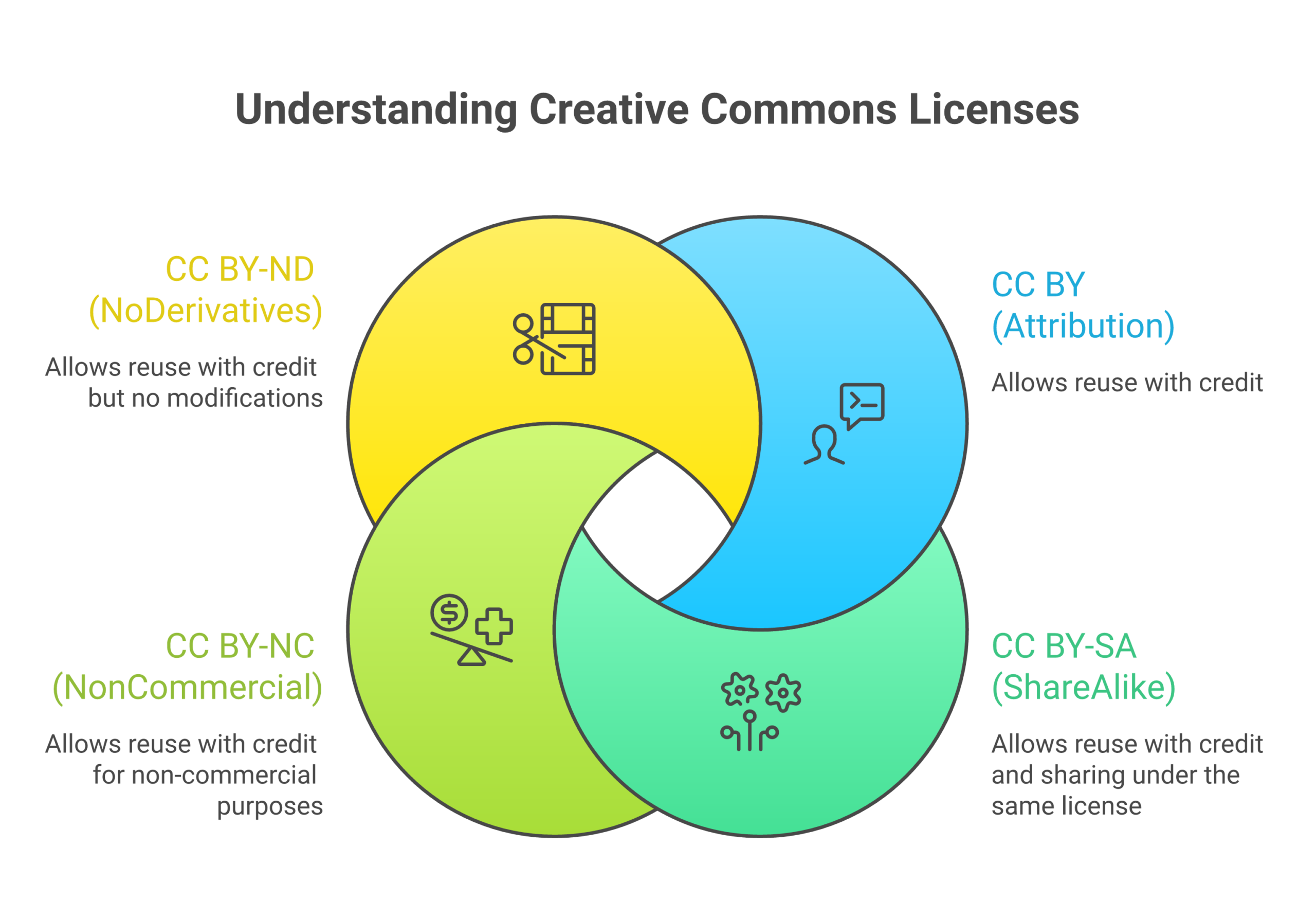 – CC BY
You can copy, share, and adapt, if you give credit to the author.
-
CC BY-SA
Same as CC BY, but if you remix it, you must share your version under the same kind of license. -
CC BY-NC
You can use and adapt it, but not for commercial use. -
CC BY-ND
You can share it, but you cannot change it.
Libraries often give simple charts that explain which licenses let you reuse and remix, and which ones are more strict.[^3]
For Bitcoin study, this means you might be allowed to:
- Download a chapter
- Highlight and take notes
- Save a copy to your tablet
- Share a link with a friend or study group
If you want to translate, cut, or mix chapters into your own notes, look for a license that clearly allows adaptation, such as CC BY.[^4]
Quick “license block” check to save time
You are busy. You want to learn, not study copyright all day.
So use this simple three step scan on any free textbook website:
-
Find the license block
Look near the front page, footer, or “About this book” page. Search for “Creative Commons,” “CC BY,” “license,” or a CC logo. -
Look for clear words like “You may”
Good OER pages will say things like “You are free to share and adapt this material.” If the page is silent about reuse, treat it as “all rights reserved.” -
Match it to your use
- Just reading on your own? Any legal copy is fine.
- Want to share with a small group or class? Check that sharing is allowed.
- Want to mix parts into your own guide or slides? Check that adaptation is allowed and that it is not “ND” (no derivatives).
If the site does not show a license at all, or looks shady, move on. There are many trusted OER sources, so you do not need to risk using a pirate scan.
Legal vs illegal: simple signs
Here are easy clues when you search for free Bitcoin textbooks:
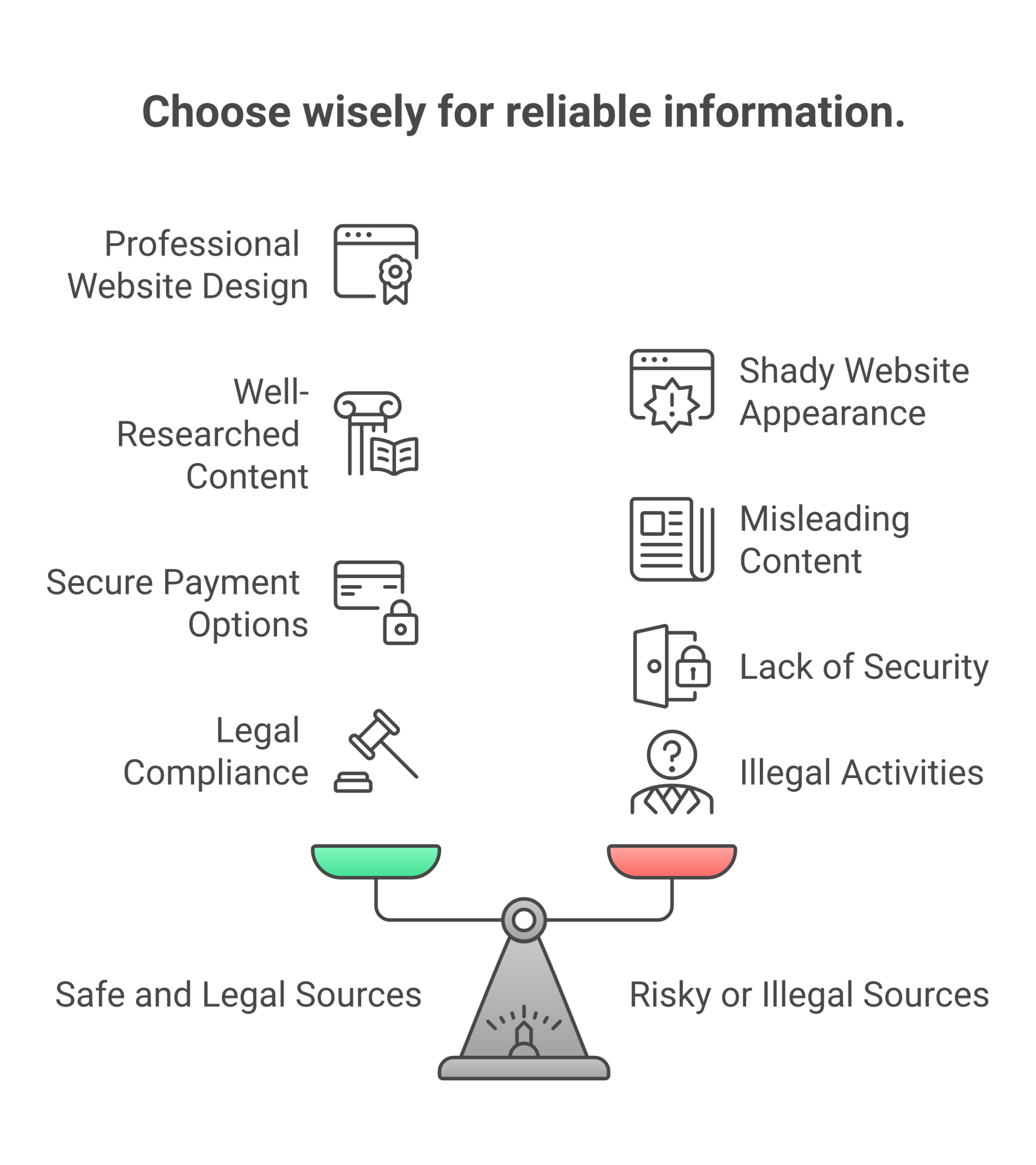 | Looks safe and legal | Looks risky or illegal |
| — | — |
| Has Creative Commons or other open license | No license info at all |
| Hosted on a school, library, or known OER site | Hosted on a random file dump or ad farm |
| Clear author, title, and year | Title only, no author |
| Says how you may use and share | Says “free download” but nothing more |
When you use tools like Google Scholar for Bitcoin facts, you often land on library pages that explain these rights clearly. That is part of what makes scholar tools safer than random search results.
How this helps your Bitcoin learning plan
Once you know how to spot real OER, you can:
- Build a small, legal Bitcoin “reading shelf” on your laptop
- Reuse chapters in your own notes for online courses for personal development
- Share links with friends who learn with you, without fear you are sharing pirate copies
If you like steady, guided help, you can also add short lessons from the free Clicks and Trades newsletter. It fits well with OER textbooks, since both aim for clear teaching instead of hype.
When you feel ready to make this part of your routine, you can Sign Up for the free Clicks and Trades newsletter so new, calm Bitcoin lessons come to you, while you keep building your own legal library of free textbook websites.
[^1]: See how Creative Commons explains its open licenses as standard tools for sharing on the official page About CC Licenses.
[^2]: A major university library notes that CC licenses work with traditional copyright to enable easier reuse of others’ work in its guide About Creative Commons Licenses.
[^3]: Many library OER guides now show simple charts for which licenses can be combined or remixed, as in the overview Open Educational Resources (OER): Creative Commons.
[^4]: For more detail on one of the most open licenses, CC BY, see the clear breakdown in the Creative Commons licenses guide from Wiley.
2) University Repositories and Open Courseware: Reliable Starting Points
If random “free textbook websites” feel risky, you are not alone.
A simple fix is to start where teachers start.
University repositories and open courseware portals are curated. That means real people check what goes in.
 These sites focus on legal, no cost learning tools, not shady uploads.[^5]
[^5]: Many college guides list trusted open textbook repositories and explain how they are reviewed, such as this overview of major OER collections in Open Textbooks and Resources for Faculty.
What you get from university OER sites
Most big schools now keep lists of open textbooks and other OER on special library pages. These lists often point to:
- Full open textbooks
- Course readers and problem sets
- Short explainers on basic money and data topics
- Sometimes whole “Intro to Bitcoin” or “Blockchain basics” units
Guides like the St. Olaf list of popular OER repositories by subject show you where teachers go to find free books for real classes. You are basically tapping into the same shelf.
You may not always see “Bitcoin” in the title. That is fine. For strong Bitcoin study, you also want:
- Intro economics
- Money and banking
- Computer science basics
- Cryptography and networks
These “Bitcoin adjacent” books help you understand the system under the coin.
Why these portals are safer than random “free PDF” pages
University OER and open courseware portals are built with copyright in mind. Librarians and faculty pick materials that use open licenses or clear terms.[^6]
[^6]: Many library OER guides stress that curated repositories focus on materials with clear permissions, as noted in this list of major OER repositories and open textbooks.
That means:
- You get real author names and dates
- You see license info, not just “free”
- Files tend to be clean, not packed with malware ads
Many portals link to big open textbook projects, such as those highlighted in National University’s guide to the Open Textbook movement. These groups design books to be free or low cost from day one, for both students and self learners.
So when you compare them with random free textbook websites, university portals are slower to browse at first, but far more steady and safe.
How open courseware maps to real classes
Open courseware is like a class without the tuition. You often get:
- A full syllabus
- Weekly lecture notes or slides
- Reading lists, sometimes linking to open books
- Homework ideas and quiz questions
For Bitcoin, this is great. You can follow a full money or computer science course week by week, using the same flow a student on campus would see.
Here is how to use it:
- Pick a course that feels close to your level, like “Intro to Cryptography” or “Money and Banking 101.”
- Download or print the syllabus.
- Treat each week as a small unit in your own plan.
- When the syllabus lists a chapter, see if there is an open textbook link or a public book entry. The Directory of Open Access Books can help find legal open books by title or subject.
If you pair that with a calm reading plan, you get something close to a full class, at home, at your own pace.
Smart search tips: filters that save time
These sites can feel huge. Filters are your friend, especially when you want Bitcoin basics fast.
Look for filters like:
- Subject: economics, finance, computer science, cryptography
- Resource type: textbook, lecture notes, video, problem set
- Level: beginner, undergraduate, “intro” or “101”
- License: “CC BY” or “CC BY-SA” if you want to reuse or remix
Many library OER guides explain what different license filters mean, so you know when you can adapt material for your own notes or online courses for personal development.
You can also start from a trusted scholar search. For example, if you use Google Scholar for Bitcoin facts, you will often land on university or library pages. From there, you can click into the school’s OER or open courseware portal and explore related free textbook websites.
A simple step by step plan for your Bitcoin shelf
Here is one way to use these portals without feeling lost:
-
Choose one home base
Pick a curated list, like a university “Find OER” page that collects big repositories in one spot.[^7][^7]: For example, this guide on how to find OER across many repositories shows tools and tips for discovering quality open resources.
-
Grab two core books
- One book on money or economics
- One book on computer science or cryptography
Make sure each is from a clear OER or open textbook project, not a random file share.
-
Add one open course
Find an open course that uses similar topics and download the syllabus or outline. -
Link it to your Bitcoin goals
As you read, keep a small note: “How does this idea show up in Bitcoin?”
This keeps the theory tied to the real thing.
If you like learning in very small bites, you can also add the free Clicks and Trades newsletter beside your open books. The short, plain language lessons fit well with open courseware, and help you connect what you read in a textbook to how Bitcoin works in daily life.
When you feel ready to make this a steady habit, you can Sign Up for the free Clicks and Trades newsletter so that clear, step by step Bitcoin notes arrive in your inbox while you keep building your own legal library from university repositories and open courseware.
3) Open Textbook Platforms and OER Hubs: Browse by Subject
If you hate guessing which free textbook websites are safe, open textbook platforms and OER hubs feel like a breath of fresh air. Here, the books are sorted, checked, and easy to scan by subject.
These sites are built for students and teachers, so they work very well for self study too.[^oerhubs]
[^oerhubs]: Many library guides collect the largest and most popular OER hubs and show how they group resources by subject, such as this overview of major OER repositories by subject.
Browse by topic, not by random title
Most big OER hubs let you click into a subject first, then pick your book. This is much nicer than typing “Bitcoin PDF” into search and hoping for the best.
Common subject paths include:
- Economics and money
- Finance and banking
- Computer science
- Cryptography and security
- Public policy and law
For Bitcoin, you might start in economics for “money and banking,” then jump to computer science for “networks” or “data structures.” Some hubs, like the BCcampus OER by Discipline directory, group open books and courses by field, so you can scan a full list for one area at a time.[^bccampus]
[^bccampus]: Subject specific OER guides, such as the BCcampus OER by Discipline directory, show how open textbooks are organized by field in a single place, as described in this subject specific OER repositories overview.
If you already use Google Scholar for Bitcoin facts, you can treat these hubs like a calmer “front door” to the same level of serious books, but sorted for you.
How open textbook platforms build trust
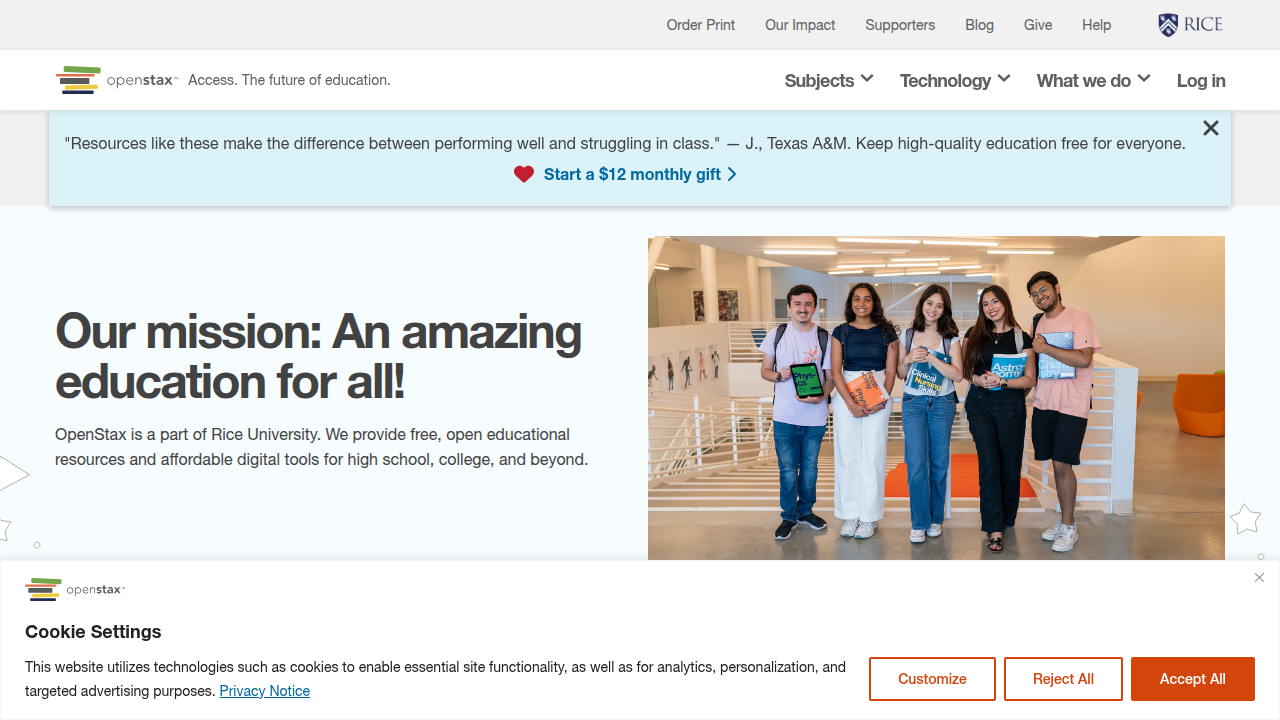
Good open textbook platforms do not just list files. They show you why you can trust each book. Many library guides point faculty to hubs that offer peer review, clear licenses, and strong metadata, such as the Open Textbook Library and OpenStax.
 [^gwuot]
[^gwuot]: Faculty guides often highlight peer reviewed open textbook platforms, as seen in this overview of open textbooks and OER repositories used by instructors.
When you open a book record, look for:
-
License info
You might see “CC BY” or “CC BY SA.” This tells you how you can share, quote, or remix the book in your own notes or online courses for personal development. -
Peer review notes
Some hubs show short reviews from instructors, rating how clear and up to date the book feels. -
Version history
You may see “last updated” dates or edition numbers. This helps when you want recent data or 2026 examples. -
Publisher or project name
Many open textbooks come from long running projects that focus on no cost or low cost books right from the start.[^openmovement]
[^openmovement]: The open textbook movement focuses on creating books that are meant to be free or low cost from day one, as described in this guide on the Open Textbook movement and OER.
If a free textbook website does not show any of this, treat it with more care.
Handy formats for any study routine
Once you find a book, you usually get more than one format. OER hubs and open textbook platforms often offer:
- Online web view for quick skimming
- PDF for a stable “print like” copy
- EPUB or other ebook formats for phones and tablets
- Sometimes print on demand links, at cost
This matters when you plan a steady Bitcoin study habit. For example:
- Use PDF on a laptop for deep weekend reading
- Keep the EPUB on your phone for bus or lunch breaks
- Print only key chapters if you like to mark with a pen
Some large lists, like broad OER resource pages kept by college libraries, point you to many hubs with these download choices in one place.[^massivelist]
[^massivelist]: Many “massive list” OER pages gather a wide set of open textbook and OER hubs, making it easier to find different formats and platforms, as seen in this overview of OER resources and repositories.
You can match the format to your day, instead of forcing your eyes to stare at one type of screen.
Using OER hubs with scholar search and real courses
You do not have to pick one path. You can mix:
- OER hubs for sorted open textbooks
- Scholar tools like Google Scholar for key terms
- Full open courses that guide you week by week
For example, you might:
- Use scholar google to search a core idea like “Bitcoin monetary policy.”
- Notice which open textbooks or OER hubs keep showing up.
- Go to those hubs and browse all economics or computer science books.
- Pair one good book with a free Bitcoin course that gives structure, such as Saylor’s “Bitcoin for Everybody,” which covers Bitcoin basics and links to outside readings.[^saylor]
[^saylor]: Some free online Bitcoin courses for beginners combine core readings with structured lessons, such as PRDV151: Bitcoin for Everybody.
If you feel lost in long videos or complex forums, this mix gives you a gentle “text first” path that you can control.
A short routine to tame big hubs
OER hubs can still feel huge at first. Here is a simple routine:
-
Pick one subject at a time
Start with “economics” or “computer science,” not both. -
Use filters on the left side
Choose level (intro, undergraduate), resource type (textbook), and license (CC BY or CC BY SA) so you know you can reuse notes. -
Bookmark two or three solid books
Do not download twenty at once. Pick a money book and a tech book. -
Add one “anchor” tool
To keep going, it helps to have short, plain language help beside dense textbooks. A free, beginner friendly resource like the Clicks and Trades newsletter can turn what you read in open books into simple, step by step Bitcoin skills without hype.
If you want those gentle nudges as you build your own shelf from real free textbook websites and OER hubs, you can Sign Up for the Clicks and Trades newsletter. It fits into a busy day, and it keeps your study path clear while you explore more open textbooks by subject.
4) Bitcoin‑Specific Academic Texts and Lecture Notes (Free and Legal)
Once you trust big OER hubs, the next step is to go closer to the source. Many Bitcoin teachers and researchers share their own free textbook websites, lecture notes, and full course packs.
These are not trading blogs. They are real class materials for students.
Where these free Bitcoin notes come from
In 2026, more colleges and online schools teach full Bitcoin and crypto classes. Some of them share:
- Syllabi
- Slide decks
- Reading lists
- Problem sets
- Draft “mini textbooks”
For example, a university course like CS 4790: Cryptocurrency is split into clear modules, starting with a general intro, then Bitcoin, then other coins and systems, and the public syllabus shows that full plan in one page for free.Course description for CS 4790: Cryptocurrency
You also see full open online courses, such as PRDV151: Bitcoin for Everybody, which walks beginners through Bitcoin economics, history, and basic tech without assuming deep math.Bitcoin for Everybody course outline
These kinds of sources give you “classroom level” structure, while still being free and legal.
How to find the good stuff, not just hype
When you search in scholar tools or on free textbook websites, it helps to aim for classes that care about core ideas, not price calls.
Look for course or book titles that focus on:
-
Money and monetary history
Words like “money,” “banking,” “monetary policy,” “inflation” -
Incentives and game theory
Words like “incentives,” “mechanism design,” “game theory” -
Security and networks
Words like “cryptography,” “distributed systems,” “network security” -
Bitcoin basics, not trading tips
Avoid “get rich,” “signals,” or “100x gains”
Big course platforms, such as Bitcoin courses on Coursera, usually list learning goals like “how Bitcoin works,” “blockchain basics,” or “wallet management,” not just trading tricks. That is a good sign in 2026.
If you want help judging which sources are serious, you can also lean on Google Scholar for Bitcoin facts. Scholar results help you spot authors and titles that keep showing up in real research, then you can go hunt for their free notes or slides.
Start with intro parts and glossaries
Academic notes can feel hard at first. Lots of symbols. New words. Long sentences.
So instead of jumping straight into “Elliptic Curve Digital Signatures,” start like this:
-
Read the course overview or first lecture
The intro lecture in many Bitcoin or “crypto and blockchain” courses sums up the big story and where Bitcoin fits, in plain terms.Overview of a crypto and blockchain fundamentals course -
Find the class glossary or key terms page
Many syllabi and lecture packs list short definitions. Save this and keep it open beside your reading. -
Pick the “Bitcoin basics” module first
In a course outline, this is often week 1, 2, or 3. Stay there until the main ideas feel clear. -
Use scholar google when a word confuses you
Type the term into scholar tools, not just into a random search box. You will see how serious authors use the word, which beats guessing.
This “intro first” habit turns scary math pages into a slow, steady path.
If you want an extra plain language helper next to dense notes, a simple guide like the free Clicks and Trades newsletter can turn those heavy lines into small, daily tips about wallets, scams, and safe first steps.
Turn lecture notes into your own mini course
You can treat each set of lecture notes like a free, tiny class for self study or online courses for personal development.
Try this pattern:
-
Step 1: One lecture at a time
Read one lecture or short PDF, not the whole pack. -
Step 2: Write your own summary
In 3 to 5 lines, answer: “What did I learn about Bitcoin today?” -
Step 3: Link ideas across courses
If a math class talks about hashing and a Bitcoin class talks about proof of work, note how they connect.Sample of a math syllabus that uses crypto topics -
Step 4: Repeat next week
Treat it like a semester. Slow is fine.
To stay grounded, you can pair these notes with wider beginner paths, such as a full “Bitcoin for beginners” course or even a list of top free crypto trading courses for the late 2020s. Just remember, your main goal here is understanding, not fast trades.
Keep the fundamentals, add gentle support
Academic texts give you depth. Free textbook websites and lecture notes give you structure. But on busy days, they can still feel heavy.
That is where a soft helper can fit in.
A step by step, plain English guide like the free Clicks and Trades newsletter can sit beside your class notes and remind you:
- What to focus on this week
- How to stay safe while you learn
- Which next topic matters most for a beginner
If you want those small nudges while you use serious, free and legal Bitcoin texts, you can Sign Up in a minute and keep building your own “mini degree” at your own pace.
5) CS, Economics, and Math Textbooks That Build Bitcoin Foundations
If Bitcoin books feel hard, it is often not your fault. Bitcoin sits on top of three big school subjects:
- Computer science
- Economics
- Math
You do not need a full degree. But a few clear chapters from good, free textbook websites can make Bitcoin feel much simpler.
Why these three subjects matter for Bitcoin
Here is how each subject helps:
-
Computer science (CS)
Teaches you about networks, data, and security.
This is how you see what a “node” is, why blocks link, and how wallets keep keys safe. -
Economics
Helps you see money, prices, and incentives.
This is how you understand fixed supply, mining rewards, and why people value Bitcoin. -
Math
Gives you tools to think about chance, risk, and big numbers.
This is how you get a feel for “hard to guess” keys and why random choice matters in blocks.
Many real Bitcoin and blockchain courses mix all three on purpose, since they know the tech, money, and math parts are tied together.Cryptocurrency and blockchain course overview that blends tech and finance
How to use free textbook websites without feeling lost
You do not have to read every page. Treat these books like a buffet. Take only what helps your Bitcoin understanding.
Here is a simple way to use free textbooks in each area:
1. Computer science: focus on networks and basic crypto
In CS books or lecture notes, look for chapter titles like:
- “Computer networks” or “distributed systems”
- “Cryptography basics”
- “Hash functions” and “digital signatures”
For example, some math and CS classes that talk about crypto topics share lecture notes instead of a paid text.Sample math course that leans on lecture notes instead of a paid book
You can:
- Skim the intro parts and diagrams
- Write down simple questions, like “What is a hash in my own words?”
- Then check how Bitcoin uses that idea in a Bitcoin course or article
Scholar tools such as Google Scholar for Bitcoin facts help you see how serious authors use these words, which keeps you away from hype.
2. Economics: money, inflation, and incentives
With free econ texts, search inside the book for:
- “Money” and “banking”
- “Inflation” and “monetary policy”
- “Game theory” and “incentives”
You only need the parts that explain:
- What money is and why people trust it
- What happens when supply grows too fast
- How rewards and rules guide what people do
Good beginner Bitcoin courses also cover this money side, not just code. For example, a full free course like PRDV151: Bitcoin for Everybody walks through Bitcoin economics, history, and basics in one place, which pairs well with simple econ chapters.
3. Math: probability, big numbers, and risk
Do not worry about deep proofs. Focus on math ideas that show up in Bitcoin, such as:
- Probability and “one in a huge number” odds
- Simple statistics and risk
- Big number thinking (orders of magnitude)
When a math or CS text explains “very low chance” events, connect that to how hard it is to guess a private key or beat the network. Even a short section on probability can change how you see security in Bitcoin.
A 3 day “mini plan” with open CS, econ, and math texts
If you are busy, try this light plan with free textbook websites and notes:
Day 1: CS basics
- Read one short section on computer networks or distributed systems
- Draw a tiny picture of Bitcoin nodes talking to each other
- Ask: “How does this help Bitcoin stay online?”
Day 2: Economics
- Read a few pages on what money is and what inflation is
- List how Bitcoin is the same as normal money, and how it is different
- Ask: “Why does fixed supply matter?”
Day 3: Math
- Read one short section on probability
- Think about how likely it is to win a lottery vs guessing a private key
- Ask: “What does this say about Bitcoin safety?”
Keep your notes small and in plain words. That way, you can use them later with more focused Bitcoin courses, such as the wide mix of Bitcoin courses on Coursera that join tech, finance, and practice.
Use visual and gentle helpers when you get stuck
Some free CS, econ, or math books feel dry. It is okay to add softer tools on top:
- A simple chart that shows blocks as boxes in a row
- A drawing of money flows when miners get rewards
- A short explainer video that walks through basics
If you want ongoing help in plain English while you build these roots, a free, slow drip guide like the Clicks and Trades newsletter can stand beside your serious texts and turn hard ideas into tiny, daily lessons.
When you are ready to make those small lessons a habit, you can Sign Up in a minute and keep using open CS, econ, and math textbooks as the deep soil under your growing Bitcoin knowledge.
6) Open Access Journals and Preprints for Deeper Bitcoin Research
At some point, free textbook websites and simple courses are not enough. You start to ask, “What are experts saying about Bitcoin this year?” That is where open access journals and preprints help.
 They let you read real research without paying or signing up for a big school.
What are open access journals and preprints?
In simple words:
-
Open access journal
A science or finance journal that lets you read full papers for free -
Preprint
A draft paper that a researcher shares before full review
Both can cover:
- Bitcoin security
- Mining and energy use
- Market cycles and bubbles
- Policy and law
Many modern Bitcoin classes, such as full university style courses on cryptocurrency, use both research papers and teaching notes side by side, so students see “live” work in the field.Course that mixes Bitcoin topics with current research material
How to find good Bitcoin papers fast
You do not need a full list of journal names. You just need a smart way to search.
A simple path is to use tools like scholar search sites, sometimes called “scholar google” or “google scholar”. If you have not tried it yet, you can learn how to use Google Scholar for Bitcoin facts as your quiet room for serious research.
When you search, try pairs like:
- “Bitcoin privacy 2024”
- “Bitcoin mining energy open access”
- “stablecoins and Bitcoin risk working paper”
Then filter for:
- “PDF” links
- “All versions” that show a free copy
- Newer years first
This turns the huge web into your own tiny free library.
Use abstracts and keywords so you do not drown
Most research papers start with:
- Title
- Abstract (short summary)
- Keywords
Use these three parts like a speed tool:
-
Read only the title and abstract first
Ask: “Is this about the part of Bitcoin I care about today?” -
Scan the keywords
Look for words you know, such as “hash rate”, “volatility”, “block size”, “Layer 2” -
Decide what to do next
- If “yes, this fits”, click the PDF and save it to a small reading folder
- If “maybe”, save only the link or title
- If “no”, close and move on
You can treat these PDFs like a reading queue, much like you do with free textbook websites. On days when you have more time, open one paper and just read the intro and last section.
If a paper feels too heavy, you can pair it with a slower, plain English guide such as the free Clicks and Trades newsletter. The short lessons can help you unpack hard words from research papers over time.
Working papers vs peer reviewed articles
Here is one key skill you gain as you move past basic online courses for personal development:
Not all papers have the same level of checking.
-
Working paper or preprint
- Shared early, sometimes not checked by other experts yet
- Great for seeing new ideas fast
- You must be extra careful and compare with other sources
-
Peer reviewed article
- Other experts read and review it before it gets in the journal
- Often slower to come out
- Usually more stable and trusted
You can often spot the type by:
- Looking for words like “working paper series” or “preprint” on the first page
- Checking if it lists a journal name and volume number
Try to:
- Use working papers for ideas and questions
- Use peer reviewed pieces when you need stronger backing
Many structured Bitcoin courses, such as broad Bitcoin courses on Coursera, also teach how to judge sources, since serious Bitcoin study mixes code, markets, and research quality.
A simple mini routine for deep research
You do not need to turn into a full-time scholar. You can make a tiny habit:
Twice a week:
- Open your scholar search tool
- Type one question, such as “Bitcoin fees long term”
- Pick one paper
- Only read:
- Title
- Abstract
- The “Conclusion” section
Then write one or two lines in your own words, like:
- “This paper says fees may rise if block space stays tight”
- “This paper says miners can shape security even when rewards drop”
Over time, this builds a very strong, clear base on top of your textbook reading.
If you ever feel lost in the mix of papers, ideas, and charts, you do not have to solve it alone. A steady helper like Clicks and Trades can stand beside your research and textbooks and keep you grounded in plain language.
When you are ready to add that gentle support, you can Sign Up for the free Clicks and Trades newsletter and keep using scholar tools and open access papers as your deeper layer under simple Bitcoin lessons.
7) MOOCs and Short Courses That Include Free Readings
Sometimes free textbook websites and research papers feel a bit loose. You may think, “I want a path. Tell me what to read this week.” That is where MOOCs and short courses help.
They give you a clear plan, but you can still learn for free.
What is a MOOC?
A MOOC is a “massive open online course”. In simple words, it is:
- A full class on the internet
- Often made by a university or expert
- Open to many people at once
In 2026, many schools and public sites use open textbooks and free readings inside these courses, so more people can learn without buying pricey books.Open textbook guides list big, trusted repositories of free course books
For you, that means a Bitcoin or finance MOOC can feel a lot like one of your favorite free textbook websites, just more guided.
How “audit for free” works
Most big MOOC sites let you “audit” a course. When you audit, you can usually see:
- Reading lists and free PDFs
- Lecture notes or slide decks
- Short videos
- Some quizzes or practice tasks
You might not get:
- A graded final exam
- A certificate
But if your goal is strong learning, not a paper badge, auditing is often enough.
This is great if you already use tools like Google Scholar as your quiet room for Bitcoin facts. The MOOC gives you the path. Scholar google and open access tools give you deeper backup when you want to dig.
Why time boxed modules fit busy people
Most MOOCs are split into weekly chunks, such as:
- 2 hours per week for light courses
- 3 to 4 hours per week for deeper ones
Each chunk often has:
- One main reading or open textbook chapter
- One or two short videos
- A few questions or a small quiz
- A simple discussion prompt
This time boxing is perfect if you are doing online courses for personal development while working a full job. You do not need to guess what to study. You just finish “Week 1” and move on.
You can also combine a MOOC with your own mini routine from the last section:
- Use the MOOC reading as your base
- Once a week, use scholar tools to find one open access paper on the same topic
- Read only the title, abstract, and conclusion to add expert views
Over time, you get both structure and depth, in small, steady steps.
Pair a MOOC with an open textbook
Here is a simple way to turn a free course into a full “home program”:
-
Pick your main open textbook
Use a trusted OER list to find a free book on Bitcoin, economics, or money. For example, many libraries now keep big lists of open educational resources and open textbooks by subject. -
Pick one MOOC that fits that topic
You might choose a broad class on digital money or a beginner crypto course. -
Match weeks to chapters
- Week 1 video and readings plus Chapter 1 of your book
- Week 2 plus Chapter 2, and so on
-
Add one “stretch” reading
Once a week, search scholar google for a fresh paper. This keeps your path current, not stuck in older print.
This mix uses the best of both worlds:
- Free textbook websites and OER for full, slow reading
- MOOCs for pacing and practice
- Scholar tools for live expert work
If you ever feel lost in the mix, a gentle guide like Clicks and Trades can sit on top of all this. It turns ideas from MOOCs and textbooks into step by step, plain language lessons, which is very helpful if you do not have a finance or tech background.
Use MOOCs without burning out
To make MOOCs work long term:
- Start with just one course
- Set a tiny rule, like “30 minutes, three times a week”
- Download or bookmark the free readings in a folder
- Take two or three notes after each lesson, in your own words
If a course pace is too fast, ignore the “due dates”. Keep using the videos and readings at your own speed. Many MOOCs stay open even after the official end date, so you can take your time.
When you want steady support next to your course, you can Sign Up for the free Clicks and Trades newsletter. It fits into the same small time blocks as a MOOC module, and it keeps your Bitcoin learning clear, calm, and safe while you move through your chosen course path.
8) Formats and Accessibility: EPUB vs. PDF, Mobile, and Offline Use
You can find great free textbook websites, but the file format matters a lot. It can decide if study feels smooth on your phone, or painful on your eyes.
Let’s keep it simple.
EPUB vs. PDF: Which should you pick?
Most free books come in EPUB, PDF, or both.
EPUB is usually better when:
- You read on a phone or small tablet
- You like to change font size or line spacing
- You use a screen reader or text to speech
EPUB text can “reflow”. That means the words wrap nicely on any screen, and you can zoom the font without lots of sideways scrolling. This helps many learners, and it also works well for people who use assistive tech.
PDF is usually better when:
- Page numbers matter for citation
- You want the layout to match a printed copy
- You study charts, complex tables, or page based problem sets
PDF keeps the same page for everyone. This is helpful when a teacher says, “See page 143” or when you mix your reading with Google Scholar papers that use strict page citations.
Easy rule of thumb
- For long reading on a phone, pick EPUB if you can
- For printing, citing, or tight layout, use PDF
If a free textbook site offers both, download both. Use EPUB for daily reading and PDF when you need page numbers or a clean print.
Why accessibility matters in 2026
In 2026, many schools and public sites must follow stronger digital access rules. New federal standards say that web content and mobile apps must meet modern accessibility guidelines, so more people with disabilities can use them well.New federal digital access rules stress that all online content should follow updated standards by 2026
That is good news for you. It means more:
- Keyboard friendly controls
- Clear headings and structure
- Better support for screen readers
Still, not every free textbook website is perfect yet. When you pick a book or course, it helps to look for:
- An accessibility statement or “Accessibility” link in the footer
- Notes about support for screen readers, closed captions, and keyboard only use
If a site talks about WCAG 2.1 or “accessibility compliance”, that is often a good sign, even if the terms feel a bit techy.
Check images, charts, and math
A lot of Bitcoin and finance learning uses:
- Price charts
- Diagrams of blocks and nodes
- Math formulas or code snippets
For each free resource, check how it handles these:
- Do images have short text descriptions or “alt text”?
- If charts carry key meaning, is there a text summary near them?
- Are formulas written as real text, not only as tiny images?
This matters if you use a screen reader today, and it also helps your future self. Even sighted readers benefit when tricky charts also have a clear written summary.
Make your learning “offline first”
Free textbook websites are great, but internet can fail at the worst time. A bus ride, a flight, or a power cut can kill your study streak.
Try this simple offline plan:
-
Download legally
- Look for “Download EPUB”, “Download PDF”, or “Export” buttons
- Only save files when the site clearly says it is allowed, such as open licenses or public domain notes
-
Use a clear folder system
On your laptop or tablet, make folders like:Bitcoin_TextbooksMOOC_ReadingsGoogle_Scholar_Papers
-
Name files in a steady way
For example:AuthorYear_Title_BitcoinIntro.pdfCourseName_Week1_Readings.epub
This helps a lot when you match MOOC weeks with book chapters or when you search later.
-
Sync to your phone
Use a cloud drive or a reader app that works on both your computer and phone. Then you can keep learning even when you step away from your desk.
If you like to mix free books with scholar google searches, this kind of file naming makes it easy to match a paper to the chapter that sparked your question.
Build a comfy mobile setup
To make mobile reading easier:
- Pick a reading app that supports both EPUB and PDF
- Set a warm background color and a font size that feels kind to your eyes
- Use bookmarks or highlights for key Bitcoin ideas you may want to check again
- Try text to speech for a chapter while you walk or ride the bus
If you pair this with short, clear lessons from a site like Clicks and Trades, you can turn spare phone time into real Bitcoin skill, without staring at tiny fonts or clumsy layouts.
Want help turning formats into a simple routine?
If all this feels like a lot, you do not have to perfect it on day one. Start with one book, one folder, and one small habit, like “download my Week 1 readings in both EPUB and PDF”.
If you want a gentle hand as you build that routine, you can also Sign Up for the free Clicks and Trades newsletter. It fits into short reading sessions on your phone, and it gives you steady, plain language tips on safe Bitcoin learning, which you can combine with any free textbook or MOOC you choose.
9) Credibility First: Vetting Textbooks, Authors, and Claims
Free textbook websites are easy to find. Trustworthy ones are not.
In Bitcoin and finance, bad info can cost you real money. So you need a simple way to judge if a book, site, or course is worth your time.
Think of this as a “credibility check” you run every time, before you believe a bold claim.
Step 1: Look at the author, not just the title
When you open a free textbook or course, pause and ask:
- Who wrote this?
- Why should I listen to them on Bitcoin or money?
Strong signs:
- The author shares a real name, not just a nickname
- They list a university, research group, or clear job role in finance, computer science, or economics
- They link to past work, like papers you can find on Google Scholar
- They show where they teach or speak, or which group reviewed the material
Librarians and schools use formal standards to judge sources, and they look for clear authorship and expertise, not hype or mystery.Professional library standards stress clear authorship and evidence based content
Weak signs:
- No author name, or “admin team” only
- Strong opinions, but no bio
- Big promises about profit, with no background to support them
If you cannot tell who stands behind the text, treat it as low trust.
Step 2: Check how claims are supported
Next, scan the text for proof.
Ask:
- Does the book show real citations or just talk?
- Are there links to papers, data, or solid reports?
- Can I test or double check this claim?
Good signs:
- Clear in text citations or footnotes
- Reference list at the end, with dates and sources you can search
- Data from public reports, research papers, or known groups
- Claims you can check in a paper or study with a quick scholar google search
Weak signs:
- “Experts say…” with no names
- “Research shows…” without any link or citation
- Charts with no source
- Claims that you cannot test at all
In 2026, academic libraries focus hard on “information literacy”, which means teaching people to question sources and look for proof, not just read and accept.Recent work in academic business libraries highlights ethics and careful use of information, not only fast access
If a Bitcoin claim has no proof, treat it as an opinion, not a fact.
Step 3: Check date, edition, and update pattern
Bitcoin moves fast. A free textbook that was solid in 2018 may be half wrong today.
When you open any resource, look for:
- Publication date
- Edition number
- Last updated note
Better signs:
- A clear date in the front or footer
- “Second edition”, “Third edition”, or similar
- A change log or “What’s new in this edition”
- Notes that laws, tax rules, or protocol changes were updated recently
Warning signs:
- No date at all
- Very old examples, like price data from years ago, with nothing newer
- References to tools or wallets that no longer exist
Some libraries now plan carefully so that students get current, not stale, digital content.Strategic frameworks for libraries stress up to date resources that help students succeed
So you can copy that habit at home. Favor books and courses that show a clear update history.
Step 4: Tell research from opinion or sales talk
Not all free textbook websites or “guides” are neutral. Some are really just ads.
Ask yourself:
- Is this text trying to teach me, or sell me something?
- Does it show more facts, or more feelings?
Research style content:
- Explains how Bitcoin works, with clear logic
- Gives pros and cons
- Admits what is unknown or still debated
- Uses careful language like “may”, “can”, or “early data suggests”
Hype style content:
- Promises you will “get rich fast”
- Uses fear, like “you will be left behind”
- Attacks anyone who asks questions
- Pushes a single coin, token, or paid group
Try this test: if you remove all money talk and market talk, does the book still teach you how the system works on a basic level? If not, it is likely more sales than study.
If you want slow, calm learning, a structured platform like Clicks and Trades can help balance out noisier sources. You can pair their step by step lessons with more formal textbooks and your own Google Scholar checks.
Step 5: Use a simple repeatable checklist
To avoid hype and fake claims, use the same short checklist each time you open a new book, PDF, or course.
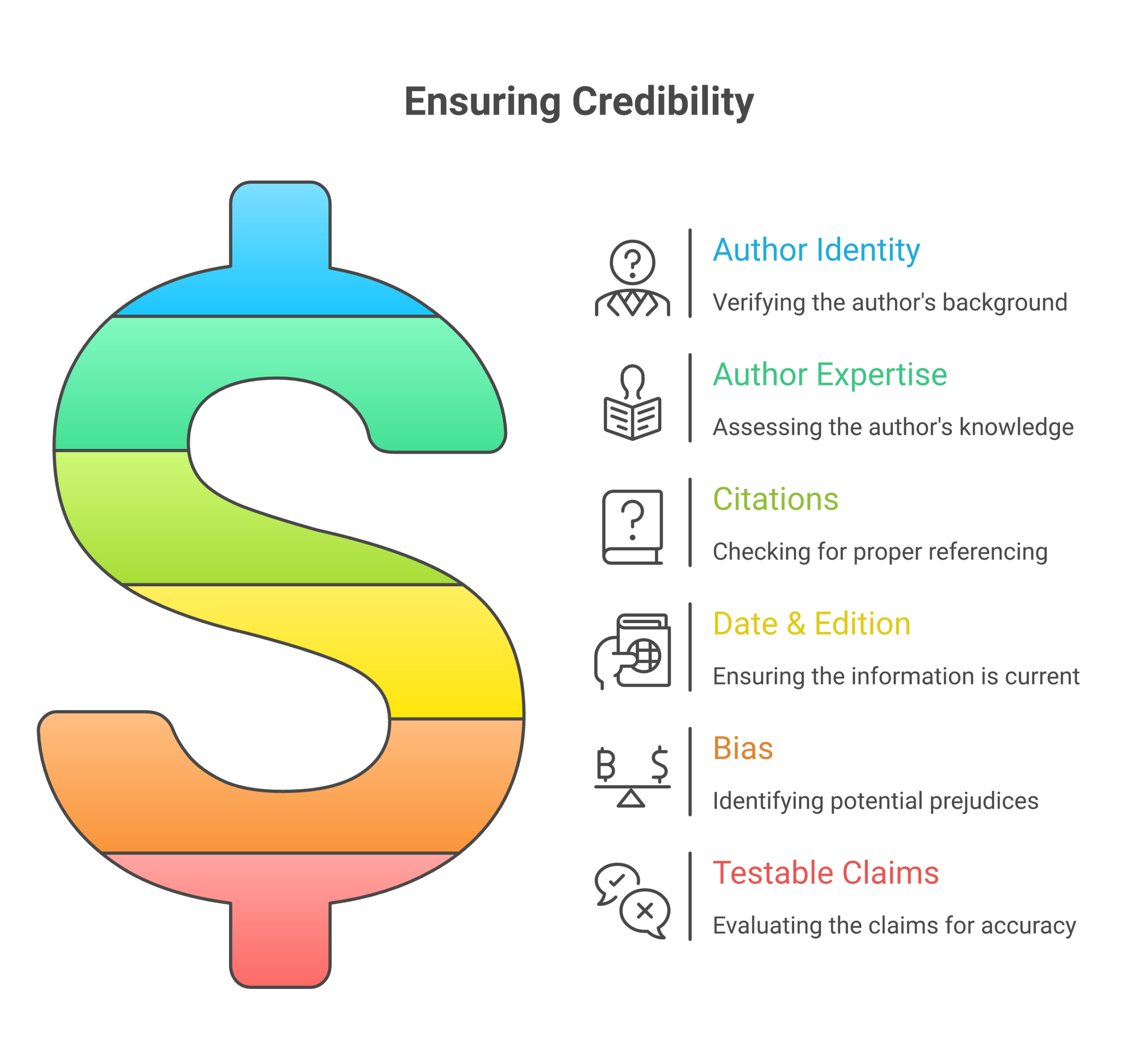 You can copy this table and keep it in your notes:
| Check item | Quick question to ask | Pass / Fail note |
|---|---|---|
| Author identity | Do I know who wrote this? | |
| Author expertise | Are they trained or active in this field? | |
| Citations and proof | Can I see sources or data to check? | |
| Date and edition | Is it recent and clearly updated? | |
| Bias or sales pressure | Is it trying to teach, not just sell? | |
| Testable claims | Can I verify key claims on my own? |
If a resource fails more than one or two rows, it might still be fine for curiosity, but do not base big money choices on it.
Need help sorting signal from noise?
Vetting books and checking claims can feel heavy at first. It gets easier with practice, and you do not have to do it alone.
You can mix careful reading with calm, guided lessons that already lean on solid sources. The free Clicks and Trades newsletter is built for that kind of support. It gives you short, plain language tips on how to judge Bitcoin claims and stay safe, and you can blend those tips with any free textbook websites or online courses for personal development that you choose.
If you want that steady, gentle help in your inbox, you can Sign Up in a minute and keep building your own clear, evidence first Bitcoin study path.
10) Safe Access: Avoiding Piracy, Malware, and Scams
Free textbook websites can help you learn a lot. They can also hide big risks.
When you hunt for Bitcoin books or online courses for personal development, you want free, safe, and legal. Not “free, but full of malware” or “free, but stolen.”
Here is how to stay safe while you study.
 ### 1. Skip shady “free PDF” sites
Many sites scrape or rehost full textbooks without any rights to do it. That is piracy, and it can hurt both you and the author.
Safer signs:
- The book is on a university site, a library site, or the author’s own page
- The page clearly says “open access”, “open educational resource (OER)”, or shows a Creative Commons badge
- The file is shared by a group that talks about copyright or open licenses
Creative Commons licenses let creators share work in a clear, legal way, and tell you how you may reuse it.They sit on top of normal copyright and give the public set permissions to copy and share
Risky signs:
- Random site with a long string of numbers in the URL
- “Any textbook, any edition, free PDF” style claims
- Pop ups, gambling ads, or adult ads around the download button
If the site “feels” like a pirate movie site, do not trust it with your laptop, phone, or wallet info.
2. Use trusted paths to the file
You already saw how to vet authors and claims. Now do the same for where you click.
Better paths to free textbook websites:
- Search the book title plus “pdf” on Google Scholar, then follow links that go to .edu, .org, or known publishers
- Start from your library or school resource page and jump to listed OER sites
- Use links from a well known course, teacher, or Bitcoin learning platform
Try not to grab files from comments, random social posts, or link shorteners you cannot read.
3. Practice safe downloading
Even a legal book file can be wrapped in bad code if a fake site hosts it. So build a simple “download habit.”
Before you download:
- Check the file type
- Good for books: .pdf, .epub, maybe .mobi
- Avoid: .exe, .bat, .scr, or anything that wants to “install” a reader for you
- Hover over the link
- On a laptop, move your mouse over the button and look at the bottom of your browser
- Make sure it goes to the same site you see, not some strange domain
After you download:
- Scan the file with your antivirus tool or built in system scan
- Open it first in a simple viewer, not inside your browser if you feel unsure
- If your device warns you, stop and delete, do not click “run anyway”
Schools and safety groups in 2026 stress that simple habits like link checks and scans are still the best first line of defense against digital threats.Online safety training for education keeps warning about malware and phishing risks for students and staff
4. Watch for phishing and fake logins
Some “free book” pages are not about books at all. They try to steal your logins or even your crypto.
Red flags:
- You are asked to “log in with email and password” on a site you do not know
- The page asks for your seed phrase, wallet key, or bank card info just to read a PDF
- The logo looks like a big brand, but the web address is slightly wrong
If you see a login box, pause:
- Check the URL letter by letter
- Look for the padlock icon in your browser, then click it to see if the site name matches
- Ask yourself, “Do I really need an account to read a free textbook?”
Never type any Bitcoin wallet data into a book site. Ever.
5. Be careful with “too good to be true” offers
Some scam sites mix “free textbooks” with crypto offers, like:
- “Download this full $200 textbook free, and get a special Bitcoin signal group”
- “Get rich with this secret PDF, just pay a small BTC fee first”
These mix piracy, hype, and money pressure. Walk away.
If you want real, slow learning on money and Bitcoin, pair safe free books with a calm guide. A beginner first platform like Clicks and Trades focuses on step by step lessons, not tricks. You can keep your reading time clean, and learn how to spot offers that feel off.
6. Build your own “safe access” checklist
You can keep this tiny list next to the credibility checklist from the last section:
- Is this site legal and clear about sharing rights?
- Did I reach it from a trusted source, like scholar google, a library, or a teacher?
- Is the file a normal book format, not an app or installer?
- Did I scan the file before opening?
- Did I avoid logging in or sharing any wallet or payment info?
If you say “no” to any one of these, slow down and try a different source.
Want steady help staying safe?
You do not have to remember every safety step at once. You can learn little by little.
If you like short tips, checklists, and plain talk about safe Bitcoin use, the free Clicks and Trades newsletter can help you turn safe habits into your normal way to study. It fits well next to any free textbook websites or online courses for personal development you use.
If you want that kind of gentle support, you can Sign Up in a minute, then keep learning Bitcoin with less risk and a lot more calm.
Summary
This guide helps you find free, trustworthy textbooks and study materials to learn what Bitcoin really is, without hype or sales pitches. You will discover how to identify legal open educational resources (OER) using Creative Commons licenses, access university repositories and open courseware, and navigate open textbook platforms safely. The article walks you through using complementary subjects like computer science, economics, and math to build strong Bitcoin foundations, then shows how to deepen your knowledge with open access journals, preprints, and MOOCs that include free readings. You will also learn practical skills like choosing the right file format for mobile study, vetting authors and claims for credibility, and protecting yourself from piracy, malware, and scams. By the end, you will know how to sort signal from noise, distinguish teaching from sales talk, and build a calm, evidence-based Bitcoin learning plan using safe, legal, and free resources that fit into a busy schedule.